It was 7:40 on a Thursday and Hannah was already late. Swimming had moved to five o'clock, her au pair Lucia needed to know, and the school run was happening in ten minutes. She knew where this was going: open the calendar, find the event, tap edit, change the time, check the end time, save. Then message Lucia anyway, because the calendar alone never feels like enough.
She did none of it. The message went into WhatsApp, and by Friday morning nobody could say whether Lucia had seen it.
Plenty of families have this exact gap. The calendar is there, but a form with eight fields is slower than a sentence, so the sentence goes into a chat and the calendar quietly falls behind. We wrote about that pattern in why host families end up juggling seven apps. The smaller fix is to make the calendar as quick as the chat.

Schedules, tasks and costs with your au pair, in one app.

One field at the top of the dashboard
In the AuPairSync app, the top of the dashboard has a field called "Ask or add something". You type what you would say out loud, for example:
- "Move swimming to 5pm"
- "Who picks up Noah on Friday?"
- "What's on tomorrow?"
The app works out what you mean and shows you a card with the result. If it is a change, the card says what will happen, such as "Move this event?" with the button "Move to 17:00". If it is a question, you get the answer on the card.
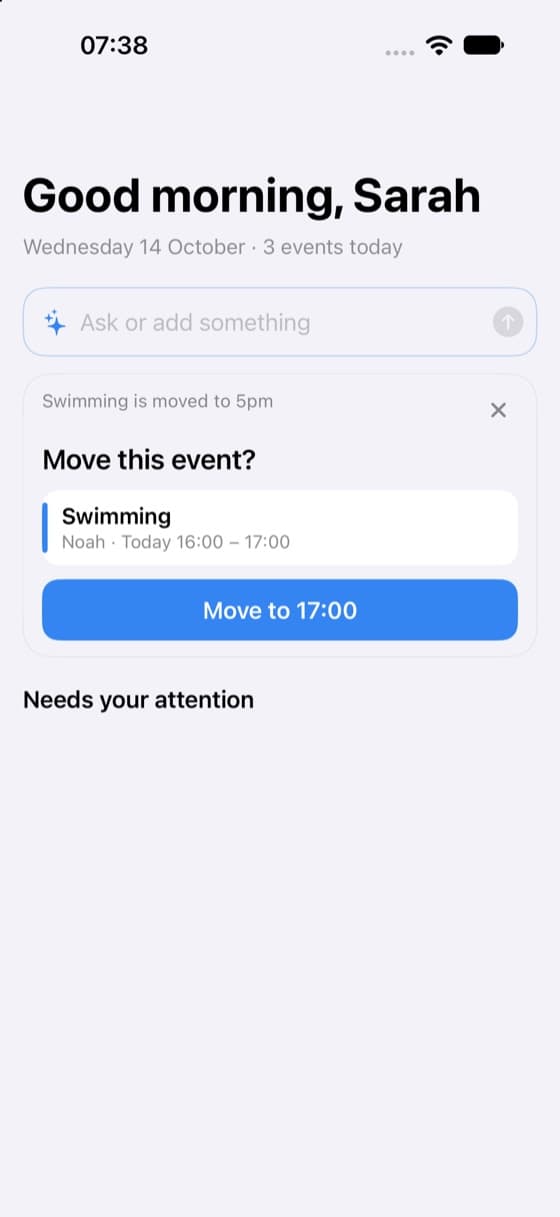
Key takeaway: Nothing is saved until you confirm. The app shows what it understood first, and you tap to apply it or leave it.
That one rule matters more than the speed. A typo or a half-understood sentence costs you a glance at the card, not a wrong entry in the family plan.
What you can say
You do not need special wording. These are the kinds of sentences the field handles:
| You type | What the app does |
|---|---|
| "Move swimming to 5pm" | Offers to change the event's time |
| "Cancel piano on Wednesday" | Offers to cancel that event |
| "Lucia picks up Mia on Tuesday" | Offers to change who does the pick-up |
| "Someone else is collecting Noah on Friday" | Offers to note a pick-up by another person |
| "Lucia has Monday off" | Offers to add the time off |
| "Spent 12.50 on craft supplies" | Offers to add an expense |
| "Pasta on Thursday" | Offers to add it to the meal plan |
| "Laundry is done" | Offers to mark the task as done |
| "What's on tomorrow?" | Answers from your family plan |
When your sentence describes a new event or task rather than a change, the app opens the normal form with the fields already filled in. You look it over, fix anything, and save. So "Dentist for Mia on 12 November at 3pm" gives you a prepared event form instead of an empty one.
Three mornings where it helps
The change that cannot wait
This is Hannah's Thursday. Typing "Move swimming to 5pm" takes a few seconds, and the change shows up in the shared calendar for Lucia like any other edit. You still say good morning in person, but the schedule is no longer hiding in a chat.
The question you ask five times a week
"What's on tomorrow?" is the one many parents ask their au pair, their partner and themselves, usually while standing in a doorway. Ask the field instead. The answer comes from the plan the family already keeps, so it is only as good as that plan, which is another reason to make updating it easy.
The small stuff that never gets written down
An expense paid out of pocket, a day off agreed over breakfast, a task finished: these are the things that get remembered at the end of the month and argued about. A single sentence at the moment it happens is usually enough. For tasks, see how assigning and tracking them works, and our guide to task management with an au pair for the human side.
What happens to the sentence
Because you type free text, it is fair to ask where it goes. The short version, in plain words:
- The sentence is sent for processing only when you send it, not while you type.
- For a question, the plan entries of the days you asked about go along, but not notes, places or descriptions.
- AuPairSync does not store the question or the answer. The only thing it counts is how often the feature is used.
The exact wording, including what is sent and to which processor, is in the section of the privacy policy on the "Ask or add something" field. If you would rather not use it at all, the normal forms work exactly as before.
Where it fits in a week
Typing a sentence does not replace a proper conversation about the week. A clear weekly schedule still comes first, and the field is for the changes that happen on top of it. Used that way, it takes the friction out of the many small updates that otherwise end up in a chat thread.
If you want to try it, the "Ask or add something" field is in the current AuPairSync app. The shopping list has its own page too, in case you want to see how that part of the app works: shopping lists and expenses.
Want your changes to land in the plan instead of a chat thread? Download AuPairSync and try one sentence tomorrow morning.