Deine Familien-Kommandozentrale
Alles, was du für die Koordination mit deinem Au Pair brauchst, an einem Ort. Aufgaben, Termine, Nachrichten und Kinderaktivitäten auf einen Blick.
Etwas fragen oder hinzufügen
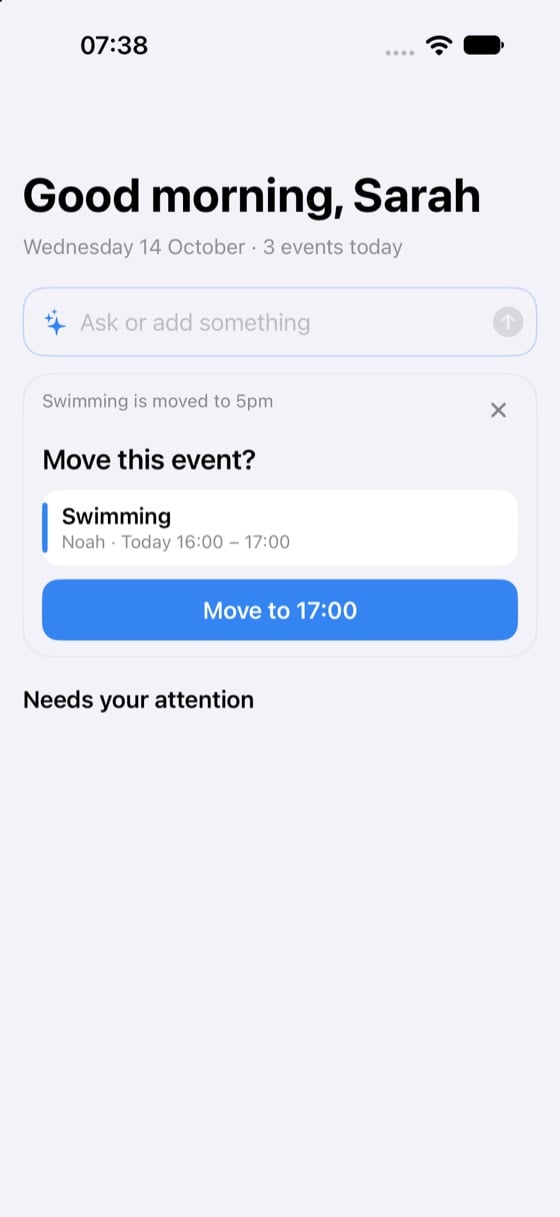
Oben im Dashboard nimmt das Feld „Etwas fragen oder hinzufügen“ einen ganzen Satz entgegen. Tippe, was du willst, und die App antwortet oder bereitet die Änderung vor.
- „Wer holt Noah am Freitag ab?“
- „Milch und Eier auf die Einkaufsliste“
- „Schwimmen auf 17 Uhr verschieben“
Gespeichert wird erst, wenn du bestätigst. Die App zeigt zuerst, was sie verstanden hat, und du tippst zum Übernehmen oder lässt es sein.
Was wann an den Auftragsverarbeiter geht, steht in der Datenschutzerklärung.
Dashboard für Eltern
Eltern erhalten einen umfassenden Überblick über ihre Haushaltskoordination mit schnellem Zugriff auf alles Wichtige:
- Schnellaktionen: Aufgaben erstellen, Termine anlegen oder Nachrichten senden – sofort
- Ankündigungen: Halte alle mit familienweiten Updates auf dem Laufenden
- Heutige Termine: Sieh auf einen Blick, was heute ansteht
- Aktive Aufgaben: Verfolge, was erledigt werden muss und wer zuständig ist
- Braucht deine Aufmerksamkeit: Offene Punkte, die auf einen Elternteil warten. Überfälliges Taschengeld steht ganz oben; ein Tipp darauf öffnet den Reiter Taschengeld
- Kinderaktivitäten: Behalte den Zeitplan und das Wohlbefinden jedes Kindes im Blick
Dashboard für Au Pairs
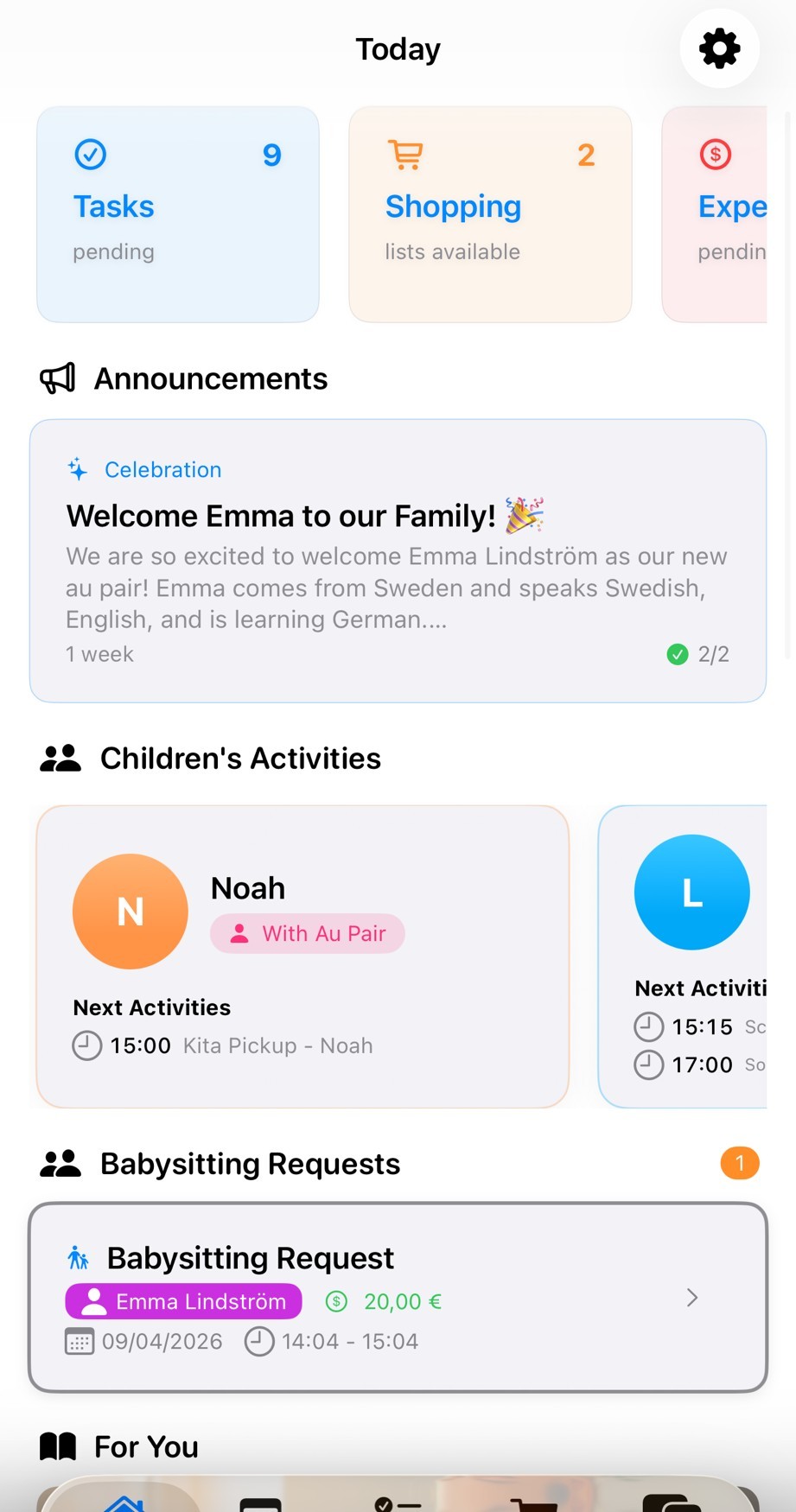
Au Pairs sehen eine fokussierte Ansicht ihrer Aufgaben und anstehenden Aktivitäten:
- Kinderaktivitäten: Sieh, welches Kind du betreust und seinen Zeitplan
- Anstehende Termine: Heutige Termine wie Snack, Klavier und Abendessen
- Meine Aufgaben: Klare Liste der heutigen Aufgaben wie „Küche putzen"
- Schnellübersicht: Alles, was du für den Tag wissen musst, auf einen Blick
- Einfache Navigation: Springe vom unteren Menü zu Kalender, Aufgaben oder Einkaufen
Warum das Dashboard wichtig ist
Alles auf einen Blick
Kein Suchen in mehreren Apps. Alles, was du wissen musst, ist direkt auf deinem Dashboard.
Rollenbasierte Ansichten
Eltern und Au Pairs sehen, was für sie relevant ist. Kein Durcheinander, nur die Informationen, die du brauchst.
Schneller Zugriff
Springe von deinem Dashboard zu jeder Funktion. Aufgabe erstellen, Kalender prüfen oder Nachricht senden – in Sekunden.
Echtzeit-Updates
Änderungen synchronisieren sich sofort auf allen Geräten. Alle bleiben automatisch auf dem gleichen Stand.
🧩 Die eigene Übersicht
Jede Person kann ihre Übersicht selbst einrichten. Wählt oben in der Übersicht „Dashboard anpassen“, zieht die Karten in eure Reihenfolge und blendet aus, was ihr nicht braucht. Es ändert sich nur die eigene Ansicht; die anderen in der Familie behalten ihre. „Braucht deine Aufmerksamkeit“ bleibt oben.
Eine Karte auszublenden schaltet nichts ab: Die Funktion bleibt in der App, wo sie war. Ausgeblendete Karten könnt ihr wieder einblenden oder das Standard-Layout wiederherstellen.
Weitere Funktionen entdecken
📢 Ankündigungen — Teile, was wichtig ist
Wichtige Informationen sollten nicht im Chat untergehen. Mit Ankündigungen sendest du Updates an die ganze Familie – und siehst, wer sie gelesen hat.
Hohe Priorität
Für dringende Updates: Terminänderungen, neu entdeckte Allergien, Notfallanweisungen. Alle erhalten sofort eine Push-Benachrichtigung.
Beispiel: „Max hat eine neue Erdnussallergie – ab sofort"
Normale Priorität
Für alltägliche Updates: kommende Termine, Regeländerungen, hilfreiche Erinnerungen. Normal zugestellt, auf dem Dashboard sichtbar.
Beispiel: „Großeltern kommen nächstes Wochenende – angepasster Zeitplan"
Niedrige Priorität
Für nützliche Infos: Essensvorschläge, Aktivitätsideen, allgemeine Notizen. Keine Benachrichtigung, sichtbar beim Öffnen der App.
Beispiel: „Neue Snack-Optionen in der Speisekammer"
Geplante Ankündigungen
Jetzt schreiben, später senden. Plane Ankündigungen für bestimmte Daten und Uhrzeiten – perfekt für bevorstehende Änderungen.
Beispiel: Montags-Routineänderung am Freitagabend planen
Lesebestätigungen & Bestätigung
Frage dich nie wieder, ob dein Au Pair die Nachricht gesehen hat. Jede Ankündigung zeigt, wer sie gelesen hat und wann – damit du weißt, dass wichtige Informationen wirklich angekommen sind.
Bereit für mehr Ordnung?
Schließe dich Familien an, die bereits besser mit AuPairSync koordinieren.