
Let's play a game. Count how many apps you use to coordinate with your au pair:
- WhatsApp — "Can you pick up Emma at 3 instead of 4?"
- Google Calendar — shared family calendar (that nobody actually checks)
- Apple Notes — house rules, emergency contacts, medication info
- Photos — sharing pictures of the kids' day
- Email — the formal stuff
- A to-do app — grocery lists, errands
- Maybe even a spreadsheet — tracking hours and pocket money
Sound familiar? You're not alone. The average au pair host family juggles 5-7 different apps just to keep daily life running. And it's slowly driving everyone crazy.
We've talked to hundreds of host families, and the pattern is remarkably consistent. It usually starts innocently — a WhatsApp message here, a calendar invite there. But within a few weeks of an au pair's arrival, families find themselves managing a tangled web of tools that were never designed to work together. What starts as "let's just use what we already have" turns into a daily source of friction, confusion, and dropped balls.
The Real Cost of App Juggling
Let's break down what this fragmentation actually costs your family — because it's more than just mild inconvenience.
Lost Information
"I sent you the allergy list… was it in WhatsApp or email? Or did I put it in Notes?"
When information lives in seven different places, it effectively lives nowhere. Critical details — like a child's medication schedule or a school's emergency pickup policy — get buried in chat histories. And it's not just about finding information once. Every time something changes — a new allergy, a different pickup time, updated emergency contacts — you have to remember which app you put the original in, update it there, and hope everyone notices.
Think about what happens when your au pair needs to find your child's doctor's phone number at 4 PM on a Tuesday while you're in a meeting. They search WhatsApp — nothing. They check Notes — it's an old version from two au pairs ago. They try email — buried in a thread from week one. Meanwhile, your child has a 38.5°C fever and minutes matter.
This isn't a hypothetical. It happens more often than anyone admits. Having complete child profiles in a single accessible place isn't just convenient — it's a safety issue.
Communication Gaps
Your au pair messages you on WhatsApp about tomorrow's schedule change. You respond in the family calendar. They don't see it. Nobody's at school pickup on time.
This isn't a people problem. It's a systems problem.
Here's how it typically spirals: your partner adds a dentist appointment to Google Calendar. You mention it to the au pair over breakfast. They make a mental note but forget by afternoon. Nobody wrote down who's handling pickup during the appointment. At 2:45 PM, everyone assumes someone else is on it. Sound familiar?
The root cause is that communication and scheduling live in different apps, so context is always missing. A message about a schedule change should live next to the schedule itself. A note about a child's mood should be linked to the events of that day. When these things are disconnected, people fill the gaps with assumptions — and assumptions fail.
Families who've navigated their first week with an au pair successfully know that setting up clean communication channels from day one prevents these cascading miscommunications later.
No Single Source of Truth
When both parents, the au pair, and maybe even grandparents all need to be on the same page, having information scattered across personal apps is a recipe for miscommunication.
"I thought YOU were picking her up." "No, I changed it in the calendar." "Which calendar?"
This problem multiplies with every person you add to the coordination chain. Each person has their own preferred app, their own notification settings, their own way of organizing information. Parent A lives in Google Calendar. Parent B checks WhatsApp obsessively. The au pair prefers to check a pinned note. Grandma uses email.
Now multiply that by every type of information you need to share: schedules, house rules, emergency contacts, dietary restrictions, homework expectations, activity logistics. Every combination of person × information type × app is another potential point of failure.
The result? A weekly routine that looks solid on paper but breaks down in practice because no one can point to one definitive place and say, "This is what's happening today."
Mental Load
Someone (usually one parent) becomes the "coordination manager" — the person who remembers which app has which information and makes sure everyone else knows too. This invisible labor is exhausting.
Let's be specific about what this looks like. The coordination manager:
- Remembers that the swimming schedule is in Google Calendar but the pool rules are in Apple Notes
- Knows that last week's grocery list is in the to-do app but this week's dietary change was mentioned in a WhatsApp message
- Keeps a mental map of which conversations happened in which app
- Duplicates information across platforms to make sure everyone sees it
- Fields "where is…?" questions from the au pair, partner, and sometimes grandparents multiple times a day
- Feels guilty if something falls through the cracks, even though the system is what's broken
This isn't just inefficiency. Research consistently shows that invisible household coordination labor — sometimes called the "mental load" or "worry work" — contributes to stress, resentment, and burnout. When you add an au pair to the household, you're not just adding a helper; you're adding another person who needs to be looped in on everything. The mental load doesn't decrease — it can actually increase if the systems aren't set up properly.
Trust Erosion
Here's a cost that rarely gets discussed: app juggling quietly erodes trust between families and au pairs.
When an au pair misses information because it was posted in an app they don't check, it looks like carelessness. When a parent forgets to update a schedule in one of three places, it looks like disrespect for the au pair's time. Neither interpretation is fair, but both are natural when the system makes it easy to fail.
Over time, these small miscommunications accumulate. The au pair starts to feel like they're always the last to know. The parents start to feel like the au pair isn't paying attention. What began as a tool problem becomes a relationship problem — and that's far harder to fix. A solid weekly check-in routine can surface these frustrations early, but preventing them in the first place is better.
Why Generic Apps Don't Work for Childcare Coordination
Here's the thing: WhatsApp is great for chatting with friends. Google Calendar is great for scheduling meetings. But none of these tools were designed for the specific challenge of coordinating childcare across a household.
They lack:
- Context — a message about picking up your child should be linked to the calendar event, the child's profile, and the location
- Role awareness — your au pair needs different information than your co-parent
- Childcare-specific features — medication tracking, daily reports, routine documentation
- A shared dashboard — one place where everyone sees today's plan
Let's look at a concrete example. Say your child has a playdate after school on Thursday. In a generic app setup, you'd need to:
- Add the event to Google Calendar with the address
- WhatsApp the au pair to let them know about the change
- Check Apple Notes for the other family's parent's phone number
- Remind the au pair about your child's snack allergy (was that in the Notes app or a WhatsApp message from September?)
- Confirm via text that the other family knows your au pair will be doing pickup
- Hope your partner sees all of this too
That's six steps across four apps for a single playdate. And if anything changes? Start over.
In a purpose-built system, the playdate goes on the shared calendar, linked to the child's profile (which already has allergy info), with a note visible to everyone in the household. One step. One place. No gaps.
The "We'll Just Use WhatsApp" Trap
Many families default to WhatsApp because it's already installed and everyone knows how to use it. But WhatsApp groups for family coordination have some specific failure modes:
Information drowning — important messages about medication schedules get buried between "running 5 minutes late" and photos of the kids at the park. There's no way to pin, categorize, or search by topic effectively.
No structure — a chat thread is chronological, not organized by topic. When your au pair needs to find the house rules you discussed two months ago, they're scrolling through thousands of messages.
Notification fatigue — when everything from "I love this photo!" to "URGENT: allergic reaction protocol" comes through the same channel with the same notification sound, people start ignoring notifications altogether.
No accountability — "Did you see my message?" becomes a daily refrain. There's no task assignment, no read receipts for specific instructions (not just messages), no way to confirm that critical information was not just seen but understood.
The One-App Solution
What if everything lived in one place?
- Schedule changes → everyone sees them instantly
- Kids' information → always accessible, always current
- Daily communication → contextual, not lost in a sea of memes and group chats
- Task management → clear, assignable, with photo documentation
- Daily reports → structured, consistent, linked to the child's profile
That's exactly what AuPairSync does. It's the single coordination hub designed specifically for au pair families.
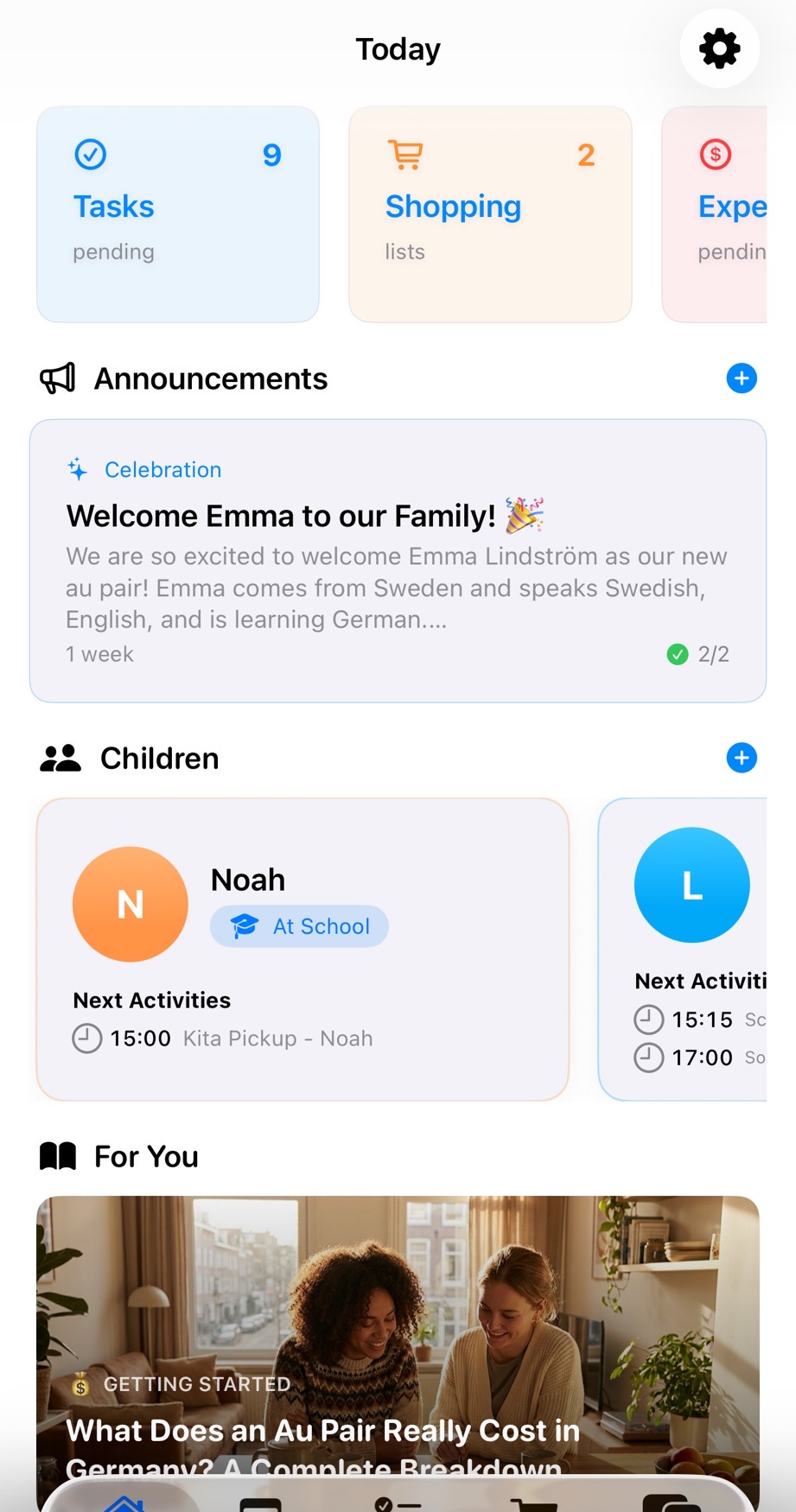
No more "which app was that in?" No more information scattered across seven platforms. No more dropped balls.
The difference isn't just convenience — it's confidence. When your au pair opens one app and sees today's schedule, the children's needs, pending tasks, and any updates from the parents, they can focus on what matters: taking great care of your kids. And when you're at work, you can trust that the right information is in the right hands without having to be the human router between seven different apps.
Making the Switch
You don't have to go cold turkey. In fact, a gradual transition works better for most families. Here's a practical four-step approach:
Step 1: Move the Most Critical Info First
Start with the information that matters most: kids' profiles, allergies, emergency contacts, and medical information. This is the content where scattered access is genuinely dangerous, not just annoying. Getting it into one authoritative place is an immediate safety improvement.
Set aside 30 minutes with your partner to fill in each child's profile completely. Include the details your au pair actually needs — not just the obvious allergies, but the behavioral cues, comfort strategies, and daily quirks that make caregiving go smoothly.
Step 2: Use It for Scheduling
Replace the shared Google Calendar (or the three competing Google Calendars) with one shared calendar that everyone actually checks. The key difference? This calendar is built for household coordination — it understands that a "dentist appointment" for your child means someone needs to handle pickup, someone needs the insurance card, and the au pair's schedule needs to adjust.
Give it a full week before judging. Old habits take time to break, and there may be a few days where people still check the old calendar out of muscle memory.
Step 3: Shift Daily Communication
Move the "how was the day" conversations and daily updates into the app. This is where most families notice the biggest quality improvement — instead of a rushed WhatsApp voice message, your au pair fills in a structured daily report. You get consistent, useful information instead of whatever they happened to remember to mention.
This also creates a valuable record over time. After a few months, you can look back and see patterns in your children's behavior, track how routines evolved, and share context with a new au pair if there's a transition.
Step 4: Phase Out the Rest
As you get comfortable, consolidate task management, grocery lists, and household instructions. Set clear house rules within the app. The goal is that within 2-3 weeks, your au pair only needs to check one place for anything related to their role.
The beauty of this approach is that each step delivers immediate value. You don't have to wait until everything is migrated to feel the difference.
What Families Say After Making the Switch
The most common reaction we hear from families who've consolidated their coordination tools isn't "this is so much more efficient" (though it is). It's "I didn't realize how much stress the old way was causing until it was gone."
When you stop being the human switchboard between seven apps, you get back headspace. When your au pair stops asking "where did you send that?", your relationship improves. When both parents can check one dashboard and know exactly what's happening with their kids today, the daily coordination conversations get shorter and more pleasant.
That's the real promise: not just fewer apps, but less friction, fewer miscommunications, and more time and energy for the things that actually matter.
Ready to make the switch? Read our first-week survival guide to see how families set up AuPairSync from day one — or download it now and stop juggling.