Lisa had the schedule figured out — on paper. Every Monday, Noah had swimming at 15:30 and Lily had violin at 16:00. Tuesdays were free. Wednesdays, both kids had early pickup at 13:00 because the school ran half days. She'd explained all of this to Emma, their au pair from Sweden, during a whirlwind kitchen-table briefing on day two.
By week three, the system had cracked. Lisa's husband had swapped his work-from-home day without telling Emma. A dentist appointment appeared on a sticky note that fell behind the fridge. Noah's swimming class moved to Thursdays — Lisa updated her own calendar but forgot to mention it. Emma showed up at the pool on Monday with Noah's swim bag, stood in an empty parking lot for ten minutes, and quietly started wondering if she was failing at this.
She wasn't failing. The family just didn't have a single source of truth for their schedule. And that's a problem no amount of verbal briefings or fridge magnets can solve.
Why "I'll Just Tell You" Doesn't Scale
In the first week, verbal scheduling works fine. There aren't many events, the au pair is shadowing you everywhere, and the rhythm feels natural. But family life isn't static. Playdates get added on Tuesday evening for Wednesday afternoon. A parent's meeting runs late. The pediatrician can only squeeze you in at 14:00 on Thursday.
Each of these changes is tiny. But each one requires someone to remember to tell the au pair — and the au pair to remember what they were told. After a month, you're playing a mental game of telephone where the stakes are your children's routines.
The fix isn't better communication habits. It's a shared calendar that both sides can see, edit, and trust.
Key takeaway: A shared calendar isn't about control — it's about making sure everyone sees the same version of reality. When the au pair can check the plan themselves, they stop relying on memory and start acting with confidence.
Setting Up Your Shared Calendar
The goal is simple: one place where every family event lives, visible to every adult in the household. Not a parent-only calendar the au pair gets screenshots of. Not a whiteboard in the kitchen. A digital calendar that syncs in real time to everyone's phone.
AuPairSync's shared calendar was built exactly for this. Both parents and the au pair see the same events, with clear labels for who's responsible for what. But the principles below apply regardless of what tool you use — the important thing is that it's shared, real-time, and specific.
What belongs on the calendar
Not everything needs a calendar entry. The morning routine is the same every day — that belongs in the daily routine document, not as a recurring event cluttering Monday through Friday. Reserve the calendar for:
- One-off events: Dentist appointments, playdates, parent-teacher meetings
- Recurring activities: Swimming, soccer practice, music lessons, language courses
- Schedule exceptions: Half days at school, public holidays, au pair days off
- Handover moments: When responsibility shifts from parent to au pair or vice versa
What doesn't belong
- The daily routine itself (use a written weekly schedule instead)
- Vague reminders like "pick up stuff" (too unclear to act on)
- Parent-only work meetings (unless they affect childcare coverage)
The Anatomy of a Good Calendar Event
A calendar entry that just says "Noah — school" is barely better than nothing. A good event answers every question the au pair might have without requiring a follow-up message.
Here's what to include:
- A clear title with the child's name: "Soccer Practice — Lily" not just "Soccer"
- Start and end time: Exact times, not "after school" or "in the afternoon"
- Location: Full address, not "the usual place" — remember, your au pair may be new to the city
- Who brings, who picks up: This is the single most common source of confusion. Spell it out.
- Notes: Anything the au pair needs to know — "bring shin guards," "park on the left side," "Lily's friend Maya is coming too"
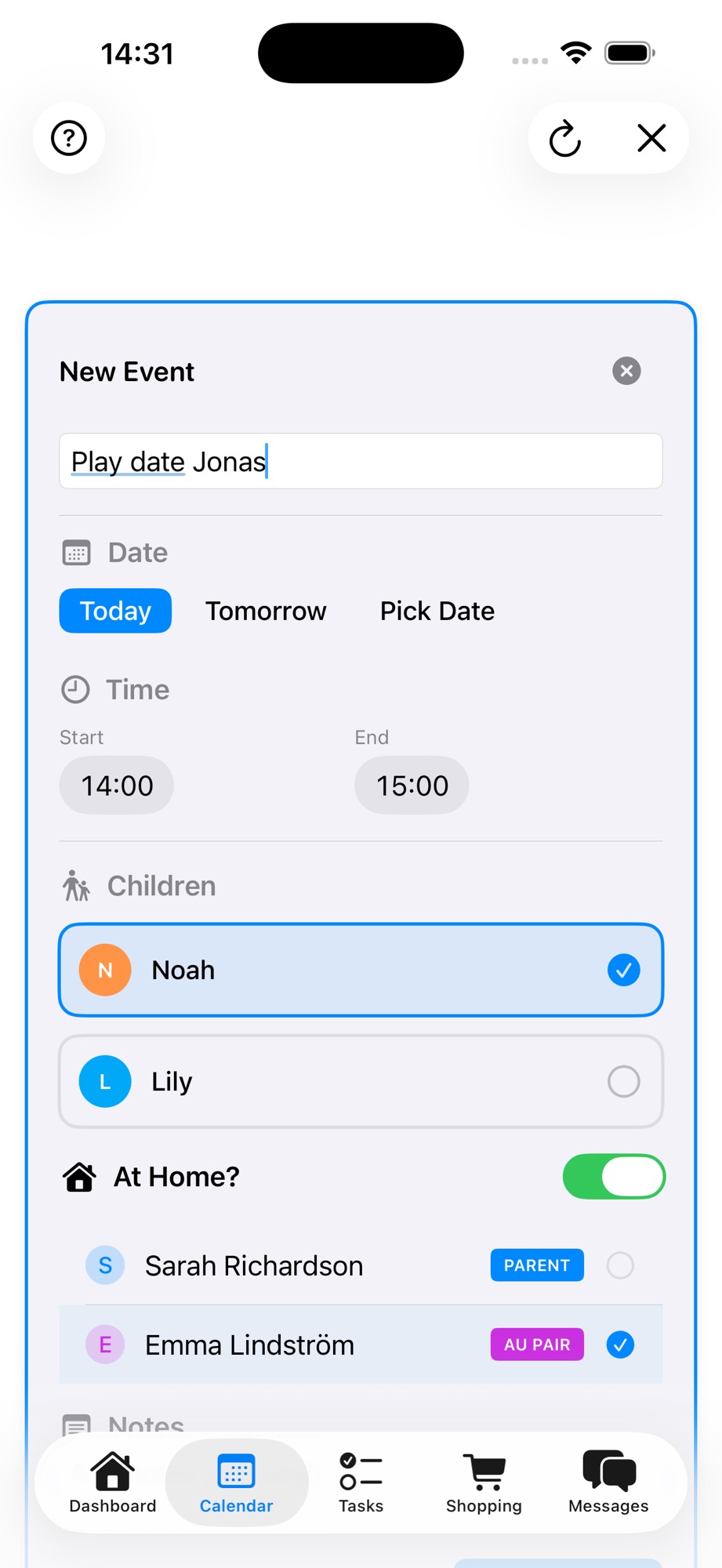
The event creation screen above shows exactly this approach — you name the event, set the time, select which children are involved, toggle whether it's at home, and assign which family member is responsible. The au pair sees this the moment you save it. No message needed.
Key takeaway: Write calendar events as if someone who's never been to that location is reading them for the first time. Because the first few times, that's exactly what your au pair is doing.
Recurring Activities: Set Them Once, Forget the Reminders
Weekly activities are the backbone of most families' schedules — and the biggest source of "wait, I thought that was Tuesdays" confusion. Setting them up as recurring events solves this permanently.
How to think about recurring events
For each recurring activity, work through this checklist:
- Which days? Not every activity runs every weekday. Soccer might be Monday and Thursday. Swimming might be Wednesday only.
- Same time every day? Monday's practice might start at 14:30 while Thursday's starts at 15:00. Set each day individually.
- Who brings, who picks up — per day? On Mondays, the au pair might handle both. On Thursdays, a parent drops off and the au pair picks up. This can vary by day.
- What about holidays and breaks? Does the activity pause during school holidays? Make a note.
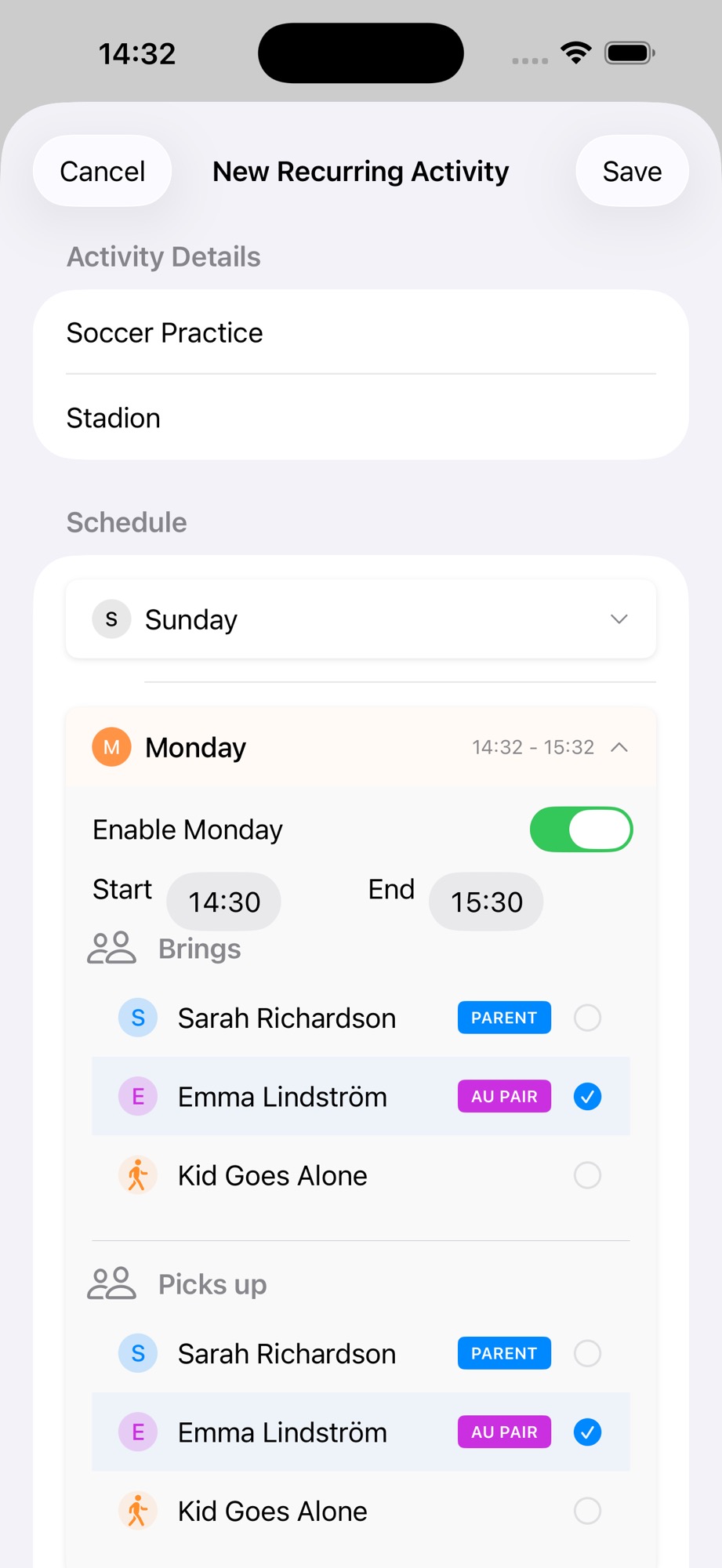
This screen shows a recurring activity where each day of the week can be configured independently — different times, different people responsible for drop-off and pickup. Set it up once, and every week the right person sees the right event at the right time.
The "Kid Goes Alone" option
As children get older, they start handling some trips independently. Maybe your ten-year-old walks to school alone but still needs a pickup. The calendar should reflect this — it eliminates the "was someone supposed to get Noah?" panic at 15:45.
Using Calendar Views for Different Needs
A shared calendar is only useful if people actually look at it. Different views serve different moments in the week.
The month view — for planning ahead
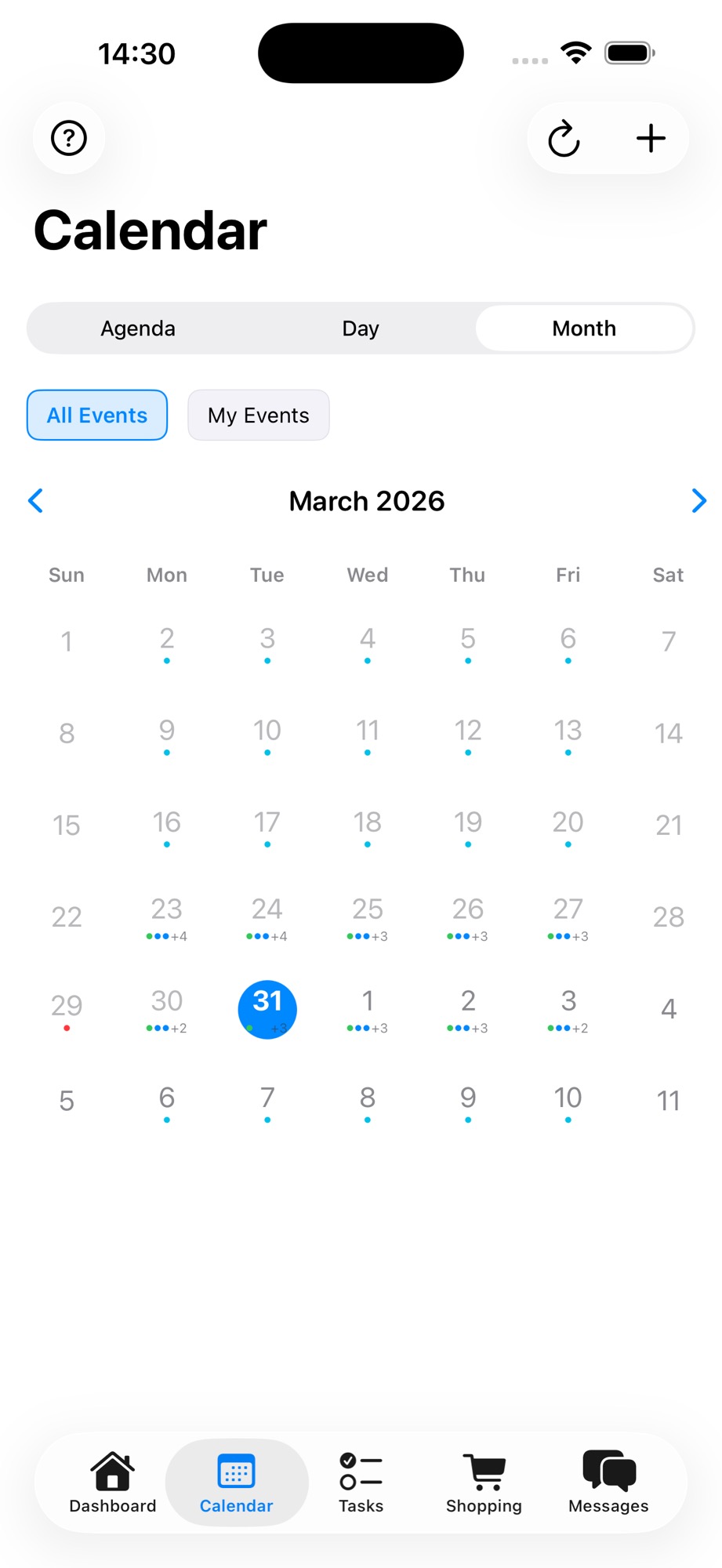
The month view gives you the big picture. Color-coded dots show which days have events, making it easy to spot busy weeks and free days at a glance. Use this when:
- Planning a new activity and looking for open slots
- Checking the upcoming week on Sunday evening
- Discussing the month with your au pair during your weekly check-in
The agenda view — for today and tomorrow
The agenda view is what your au pair will check most often. It shows today's events in chronological order with all the details — title, time, location, and who's responsible. No tapping into individual events, no guessing.
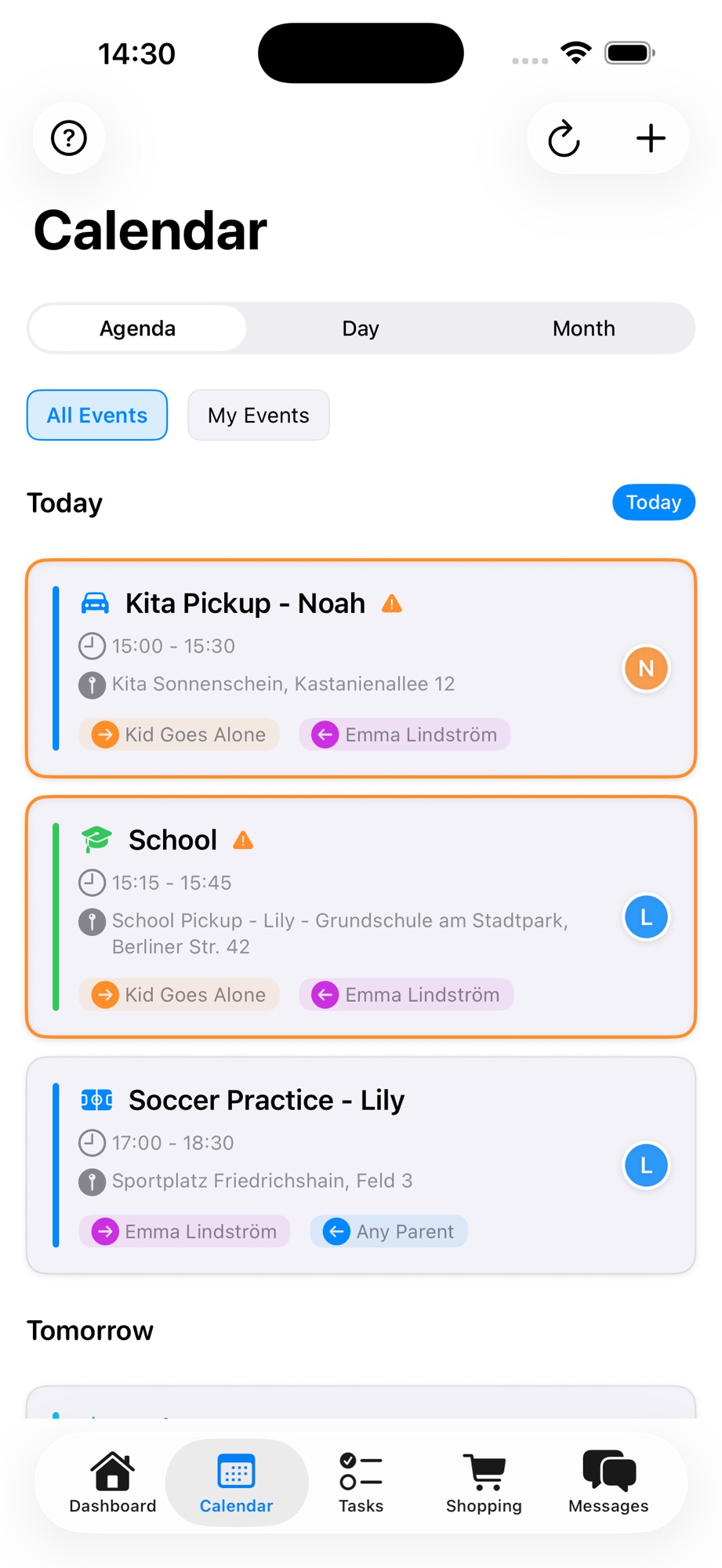
This is the view that replaces the morning kitchen briefing. Instead of "okay so today you have…" your au pair opens the app, sees what's coming, and heads out the door confident.
The "My Events" filter — for personal clarity
When the calendar fills up, the au pair might wonder: "Which of these are actually mine?" The "My Events" filter strips away everything that doesn't involve them — showing only the events they're assigned to.
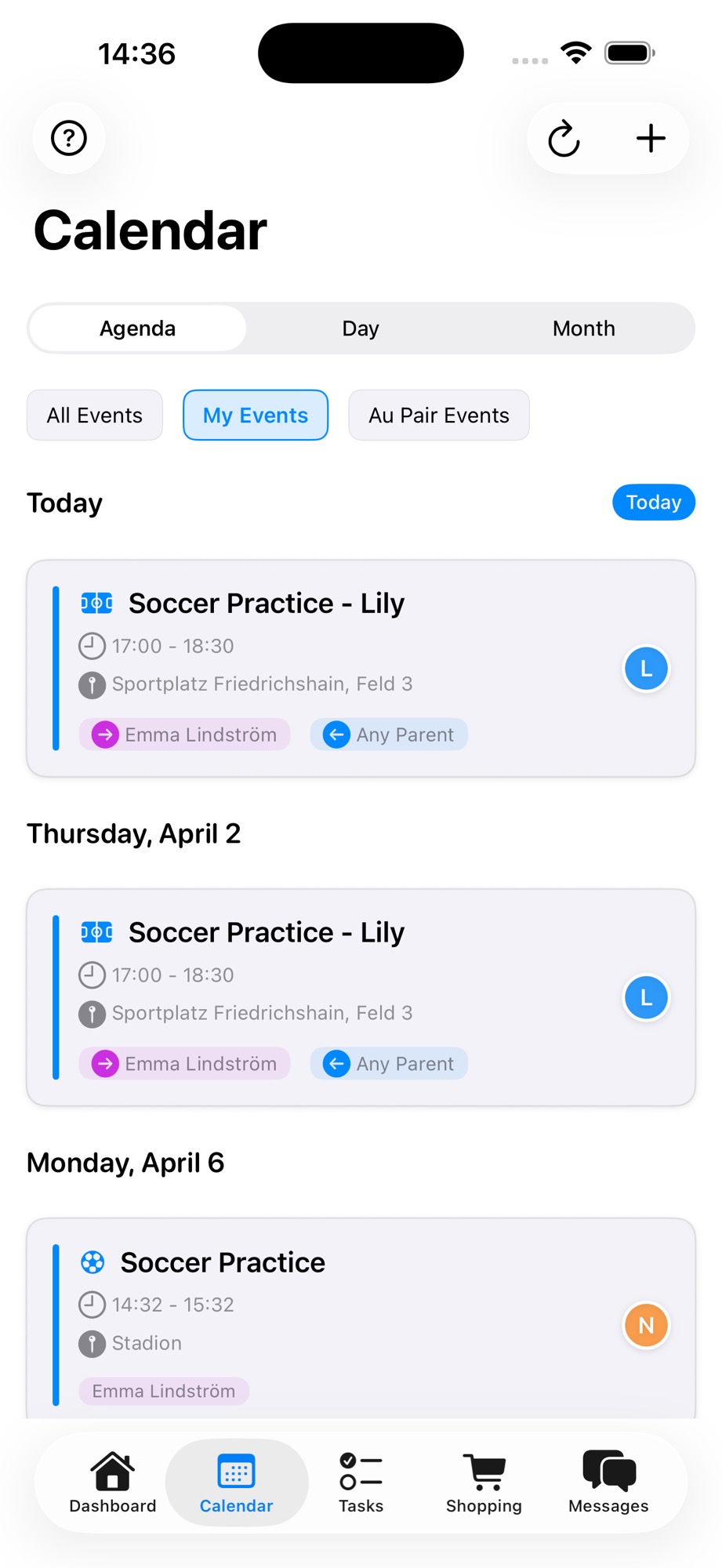
This is especially valuable in larger families or households where both parents also have events on the calendar. The au pair doesn't need to see Dad's work dinner — they need to see that they're picking Lily up from soccer at 17:00.
A Weekly Calendar Routine That Works
Having a shared calendar is the foundation. Using it consistently is what makes it work. Here's a simple routine that experienced host families swear by:
Sunday evening: the week preview
Spend five minutes on Sunday evening reviewing the upcoming week together — or at minimum, send a quick message highlighting anything unusual. "This week looks pretty standard, but Wednesday Noah has a dentist appointment at 14:00 so he needs early pickup."
This isn't about re-reading every event. It's about flagging exceptions. The routine events are already there. The au pair knows them. The Sunday preview catches the curveballs.
Daily morning: a quick glance
The au pair checks the agenda view while having breakfast. Two minutes. That's it. If something looks off — a new event they weren't expecting, a time that seems wrong — they ask before heading out, not after arriving at the wrong place.
Friday: the mini-retro
During your weekly check-in, spend two minutes on calendar hygiene:
- Did anything go wrong this week? A missed pickup, a wrong time, a surprise event?
- Is next week up to date? Any new appointments to add?
- Are the recurring events still accurate? Activities sometimes shift dates after the first few weeks of a term.
Key takeaway: The calendar is a living document. Reviewing it together once a week takes five minutes and prevents the slow drift that causes problems in month two or three.
Common Pitfalls (And How to Avoid Them)
Even with a shared calendar, families stumble into predictable traps. Here's what to watch for:
| Pitfall | What happens | The fix |
|---|---|---|
| Last-minute additions | Au pair discovers a new event 30 minutes before it starts | Set a household rule: events added at least 24 hours in advance. Emergencies happen, but they should be rare. |
| Vague entries | "Lily — thing at school" with no time or location | Use the event template above. Title, time, place, who. Every time. |
| Parent-only editing | Au pair can see the calendar but can't add events | Give the au pair edit access. They might notice a playdate invitation before you do. |
| Ignoring the calendar | Events are there, but nobody checks | Build the daily glance into the morning routine. It takes 60 seconds. |
When the Calendar Replaces the Argument
There's a subtler benefit to shared calendars that goes beyond logistics. When a misunderstanding happens — and it will — the calendar becomes neutral ground.
"I thought you were picking up Noah today" turns from an accusation into a quick check: "Let me look at the calendar — ah, it says I'm on pickup today but I swapped with you last week and forgot to update it. My mistake. Let me fix it now."
No blame. No memory disputes. Just data. This is the same principle that makes tracking working hours so powerful — when both sides can see the same information, disagreements lose their emotional charge.
Shared calendars work best alongside clear house rules and open communication through your family messaging. Together, these tools create a household where everyone knows what's expected, when, and by whom.
Getting Started Today
You don't need to set up the perfect calendar system on day one. Start small:
- Add this week's recurring activities — the ones that happen every week at the same time
- Add any upcoming one-off events — appointments, playdates, school events
- Invite your au pair — make sure they can see and edit the calendar
- Do a five-minute walkthrough — show them how to check the agenda view, how to tap for details, and how to add events themselves
Within two weeks, checking the calendar will be as automatic as checking the weather. And that daily glance — not the fridge whiteboard, not the morning briefing, not the forwarded text message — is what keeps your family running smoothly all year.
Coordinating your au pair year just got easier. Download AuPairSync to keep your family's shared calendar organized from day one.
Ready to simplify your au pair life?
Tasks, calendar, messaging and more — all in one app.

Related Articles

How to Set Up Your Family Dashboard
Complete walkthrough for setting up and customizing your AuPairSync family dashboard. Learn how to configure widgets, organize information, and create your family's command center.
6 min read
Managing Tasks with Photos and Context
Learn how to create clear, visual task assignments using photos and detailed context. Make task completion easier for your au pair with step-by-step visual guides.
7 min read

Coordinating Schedules with the Shared Calendar
Master family schedule coordination using AuPairSync's shared calendar. Learn best practices for managing events, avoiding conflicts, and keeping everyone in sync.
6 min read